Contributor profiles
People often save changes under several names or email addresses. DeepGraph shows them as one person.
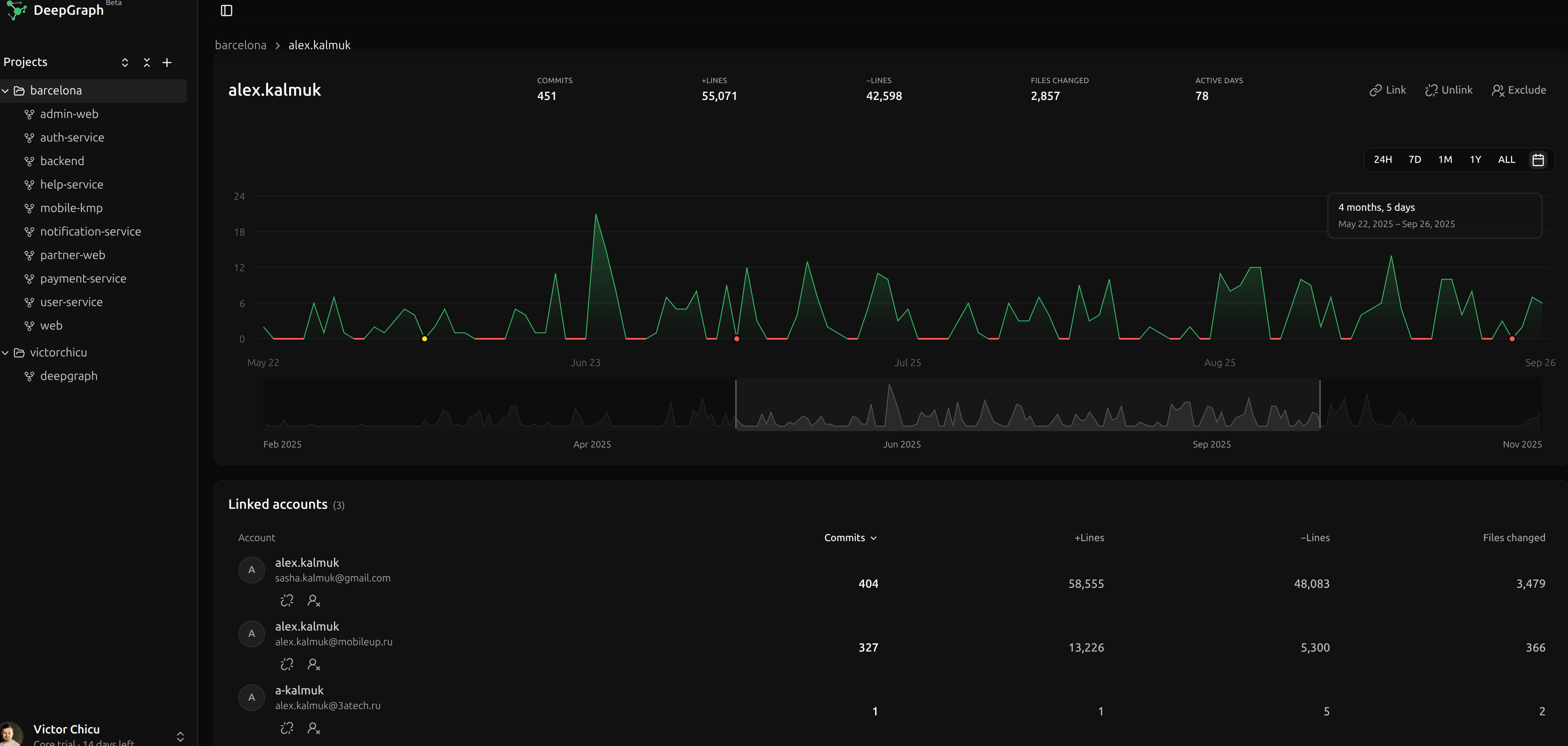
One person, one profile
DeepGraph puts together the names and email addresses that clearly belong to the same person. You can join or separate the rest yourself, and leave out bots and automated accounts so they don't skew the numbers.
What a profile shows
- How active the person has been over time.
- The projects they work on.
- The commits behind their totals, with file changes you can open and inspect. Very long changes may be shortened and are marked when the preview is incomplete.
From activity to a commit
Click a day in the profile's activity chart to see the linked profiles that contributed and when they saved their changes. Select a profile to open its commits for that day, then open a commit to inspect the file changes.
Sort and compare
Sort people by number of changes, lines added, lines removed, files changed, or days they were active, from highest to lowest or the other way round. View them as a list or a grid.
Numbers are not scores
These numbers show activity, not how good someone's work is. DeepGraph always shows them next to the changes they come from.
Plans
Your plan sets how many projects your account can hold and how much history they can have in total. See plans and pricing, or start with Getting started.